TV TradingView
STRATEGY SIGNALAlert triggered●
Webhook sent✓
Route TradingView alerts to cTrader with NRUNO — including optional cTrader-side trade management, without relying on your own always-on PC.
Generate your personal connector key inside the NRUNO dashboard.
Load the lightweight NRUNO cBot into your cTrader platform.
Copy your unique NRUNO URL into your TradingView alert box. Done!
NRUNO receives your TradingView signal, verifies your personal access and routes it directly to your connected cTrader cBot.
Your strategy keeps running even when your own computer is switched off.
WebSocket connects NRUNO directly to your cTrader cBot.
Test your signals safely first, then switch to live trading when you are ready.
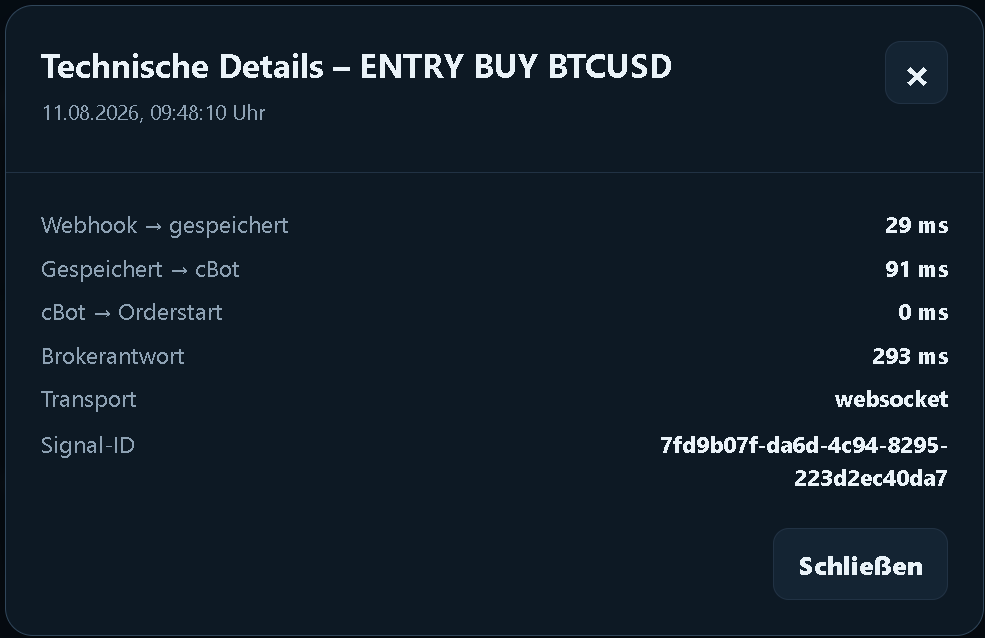
Every trade includes a date, time and status. Technical details remain available without cluttering the overview.
NRUNO records the technical processing from receipt of the TradingView webhook through transmission to the cBot and the broker response. In this example: 29 ms to store the webhook, 91 ms to transmit it to the cBot and 293 ms for the broker response.
NRUNO acts purely as a signal router. It does not need access to your broker login or your funds.
Webhook and connector traffic is transmitted through encrypted HTTPS and secure WebSocket connections (TLS).
The NRUNO cBot can transmit execution instructions inside cTrader, but it cannot initiate deposits or withdrawals.
Personal connector keys authenticate each connection and assign signals and trade records to the correct customer access.
NRUNO supports your own TradingView close signals and optional cTrader-side protection and trailing. You choose the rules; NRUNO executes them and does not choose trades for you.
Activate trailing after a chosen profit distance and keep the stop a fixed distance behind the best price.
Lock in profit in three configurable stages with separate trigger and lock values.
Use pip-based steps first, then dynamic trailing and finally confirmed FVG structure.
Trail behind confirmed Fair Value Gaps on your selected timeframe with configurable buffer and safety settings.
Move protection to entry plus a chosen offset after a configurable profit trigger — also usable together with trailing.
Alongside your TradingView signal, the cBot can apply fixed execution rules such as spread limits, trading sessions, maximum signal age, pyramiding and hedging rules, plus optional local SL/TP.
Restrict new entries by maximum spread and by UTC trading windows you define.
Limit signal age, maximum volume, pyramiding and hedging according to your rules.
Optionally set local Stop Loss and Take Profit in the cBot when TradingView does not send them.
All plans include the full NRUNO connection. They differ only in the number of Connector accesses and support priority.
1Connector access
StandardSupport priority
3Connector accesses
HighSupport priority
10Connector accesses
HighestSupport priority
One Connector access permits one simultaneously active connection between NRUNO and a cTrader instance. All plans include the same product features; only the number of accesses and the support queue priority differ.
No credit card · no automatic charge. The free trial includes one Connector access. Prices include statutory VAT where applicable.100 practical answers about TradingView, Pine Script, webhooks, cTrader execution, troubleshooting, risk management and reliable trading automation.